
Best LinkedIn Post Structure to Maximize Reach in 2026
If you’ve been posting on LinkedIn and watching your content disappear into the void, you’re not alone. The platform’s algorithm has evolved, and what worked last year might not cut it today. The good news? There’s a proven LinkedIn post structure that consistently drives reach, engagement, and real conversations.
In this guide, you’ll learn the exact framework top creators use to craft high-performing posts, the formats that dominate in 2026, and actionable templates you can copy and customize. Let’s dive in.
Why LinkedIn Post Structure Matters More Than Ever
LinkedIn’s algorithm prioritizes content that keeps people on the platform. Dwell time, comments, and shares are the key signals that determine whether your post gets shown to hundreds or hundreds of thousands of people.
A well-structured LinkedIn post structure does three critical things:
- Stops the scroll with a compelling hook in the first 210 characters (the “see more” fold)
- Keeps readers engaged with scannable formatting and clear value
- Drives action with a specific call-to-action that invites comments
Without this structure, even brilliant insights get buried. With it, you give your content the best chance to break through the noise.
The Anatomy of a High-Performing LinkedIn Post
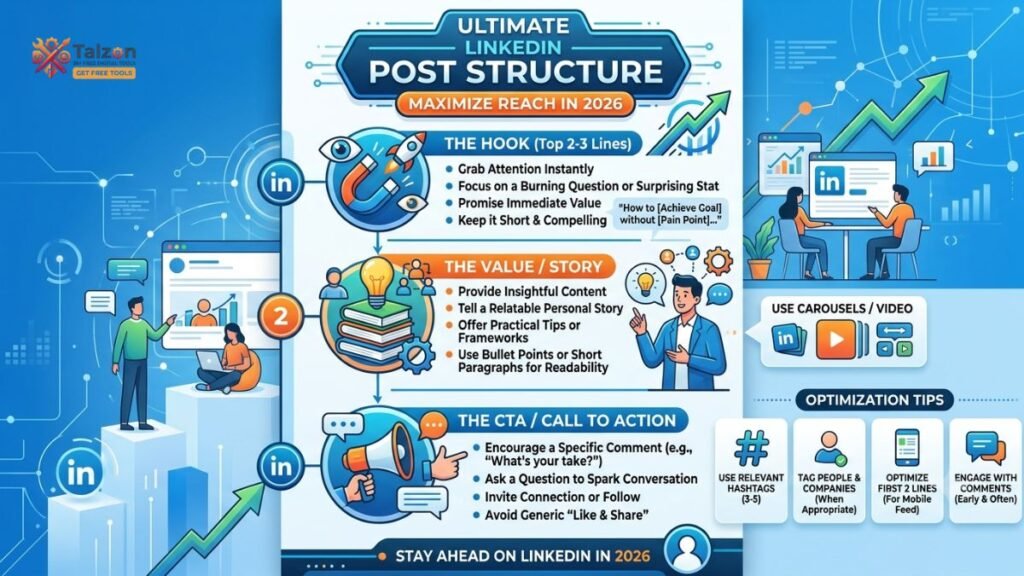
Every viral LinkedIn post follows the same skeleton. Here’s the breakdown:
1. The Hook (First 2 Lines)
You have roughly 210 characters on desktop and 140 on mobile before the “see more” button appears. This is your headline. If it doesn’t grab attention, nothing else matters.
Hook best practices:
- Keep it under 8 words when possible
- Use numbers, bold claims, or provocative questions
- Avoid generic openers like “I’m excited to announce…” (lowest-performing)
- Make it emotional, specific, or curiosity-driven
Examples of strong hooks:
- “You ever feel like you’re posting into an empty room?”
- “Most people are optimizing for the wrong LinkedIn metric.”
- “I made $50K from one post. Here’s exactly what I did.”
2. The Body (Value Delivery)
After the hook, deliver on your promise. This is where you provide insights, stories, data, or frameworks that make the reader feel like their time was well spent.
Body formatting tips:
- Use line breaks every 1-2 sentences (walls of text get scrolled past)
- Keep sentences under 12 words for mobile readability
- Use bullet points or numbered lists for 3+ items
- Bold key phrases sparingly (one per paragraph max)
Optimal post length by type:
| Post Type | Optimal Length | Character Count |
|---|---|---|
| Text-only (personal stories) | 200-250 words | 1,200-1,500 chars |
| Text-only (tips) | 80-130 words | 500-800 chars |
| Image posts | 100-150 words | 600-900 chars |
| Carousels/Document | 6-9 slides | Minimal text per slide |
| Video | 60-90 seconds | N/A |
3. The Call-to-Action (CTA)
End with a specific question or prompt that invites comments. Posts with engagement questions see 20-40% more interaction.
Strong CTA examples:
- “What’s one lesson you’d add to this list?”
- “Agree or disagree? Drop your take below.”
- “Which of these resonates most with you?”
Avoid vague CTAs like “Let me know your thoughts.” Be specific and make it easy to respond.
Top LinkedIn Post Formats That Drive Reach in 2026
Not all formats perform equally. Here’s what the data says about what works right now:
1. Carousel/Document Posts (Highest Engagement)
Carousels are the undisputed champions in 2026, generating 3.5x more engagement than text-only posts and 596% more engagement with 4x more reach year-over-year.
Carousel best practices:
- 6-9 slides maximum (avoid 20-slide novels)
- Under 12 words per slide, captions under 100 characters
- Hook on slide 1, one idea per slide
- CTA on the final slide (share, follow, comment)
- Add your face/avatar somewhere for authority
Why they work: Carousels earn 30-60 seconds of dwell time per viewer versus 5-15 for text posts. That 4-6x gap directly translates into algorithmic distribution.
2. Multi-Image Posts (3-4 Photos)
Multi-image posts lead at 6.60% average engagement, making them the best performer for visual storytelling.
Best for: Behind-the-scenes content, event recaps, team highlights, and personal milestones.
3. Text-Only Posts (Still Effective with Right Structure)
Text posts win on burst reach in the first 24 hours, especially when paired with a strong hook and scannable formatting.
Optimal length: 1,200-1,500 characters (200-250 words) for personal stories and thought leadership.
4. Video Posts (Rising, But Pick Your Battles)
Video is gaining traction, but production quality and hook matter more than ever. Short, native videos (60-90 seconds) perform best.
5. Polls (Use Sparingly)
Polls rank last in engagement and can be a “reach trap” if overused. Save them for strategic moments when you genuinely want quick feedback.
5 Proven LinkedIn Post Templates You Can Copy Today
Here are five battle-tested LinkedIn post structure templates that drive reach. Customize them with your story, data, or insights.
Template 1: The Hot-Take Opener
Structure: Bold contrarian hook → Reality check with evidence → The real lesson → Soft, relatable takeaway
Example:
“Stop chasing LinkedIn followers. It’s a vanity metric.”
I grew from 5K to 50K followers in 12 months. But here’s what I learned:
- Followers don’t pay bills
- Conversations do
- DMs do
- Trust does
Focus on depth, not breadth.
What metric are you actually optimizing for?
Template 2: The Story-Driven Narrative
Structure: Hook (emotional moment) → The struggle → The turning point → The lesson → CTA
Example:
“I almost quit LinkedIn three months ago.”
My posts were getting 12 likes. My DMs were empty. I felt invisible.
Then I changed one thing: my hook.
Instead of “Here are 5 tips,” I started with “You’re doing this wrong.”
Engagement jumped 340% overnight.
The lesson? People don’t scroll for information. They scroll for emotion.
What’s one post that changed your trajectory?
Template 3: The Listicle with Data
Structure: Numbered hook → Data-backed list → Key takeaway → Question
Example:
“7 LinkedIn post structures that drive 10x reach (backed by 1.2M posts):”
- Carousel with 6-9 slides
- Multi-image (3-4 photos)
- Text with bold hook under 210 chars
- Video under 90 seconds
- Story-driven narrative
- Data-backed listicle
- Contrarian hot take
Which one are you trying this week?
Template 4: The Before/After Transformation
Structure: Before state → The problem → The solution → The result → CTA
Example:
“Before: I posted daily and got 50 views.”
“After: I posted 3x/week and hit 100K+.”
The difference? I stopped posting for the algorithm and started posting for humans.
- Shorter hooks
- Real stories
- Specific questions
Quality over quantity, every time.
What’s your posting frequency right now?
Template 5: The Framework Drop
Structure: Name the framework → Explain each step → Show the result → Invite engagement
Example:
“The 1-3-1 LinkedIn Post Framework:”
1 hook (under 8 words)
3 body points (scannable, value-driven)
1 question (binary, easy to answer)I’ve used this on 50+ posts. Average engagement: 8.2%.
Try it on your next post and let me know how it performs.
Common LinkedIn Post Structure Mistakes to Avoid
Even with the right template, small mistakes can tank your reach. Here’s what to watch out for:
1. Weak Hooks
Starting with “I’m excited to announce…” or generic statements is the lowest-performing opener. Be bold, specific, or emotional from line one.
2. Walls of Text
If your post looks like a paragraph from a novel, people will scroll past. Use line breaks, bullet points, and white space aggressively.
3. No Clear CTA
Ending without a question or prompt leaves readers passive. Always give them a reason to comment.
4. Overusing Hashtags
Stick to 3-5 relevant hashtags. More than that looks spammy and can hurt reach.
5. Ignoring Mobile Optimization
57%+ of LinkedIn traffic is mobile. If your post doesn’t read well on a phone, you’re losing half your audience. Keep sentences short and formatting clean.
6. Posting Without Engaging
The algorithm rewards active users. Engage on 5-10 other posts before publishing yours, and respond to every comment within 2 hours.
Putting It All Together: Your Action Plan
Here’s how to implement the best LinkedIn post structure starting today:
- Write a hook under 210 characters for your next post (test 3-5 variations)
- Keep your post body to 1,200-1,500 characters for text posts
- Use line breaks every 1-2 sentences for scannability
- Add a clear CTA or binary question at the end
- Post during peak hours (Tuesday-Thursday, 7:30-8:30 AM local time)
- Respond to every comment within 2 hours to boost algorithmic signals
- Engage on 5-10 other posts before publishing yours
- Track engagement metrics weekly and double down on what works
Final Thoughts
The best LinkedIn post structure isn’t about gaming the algorithm. It’s about respecting your audience’s time and delivering value in a format that’s easy to consume.
Start with a hook that stops the scroll. Deliver value with clear, scannable formatting. End with a question that invites conversation. Repeat.
Master this framework, and you’ll not only drive more reach—you’ll build a community that actually cares about what you have to say.