
Why Remove Image Metadata Before Sharing Photos Online
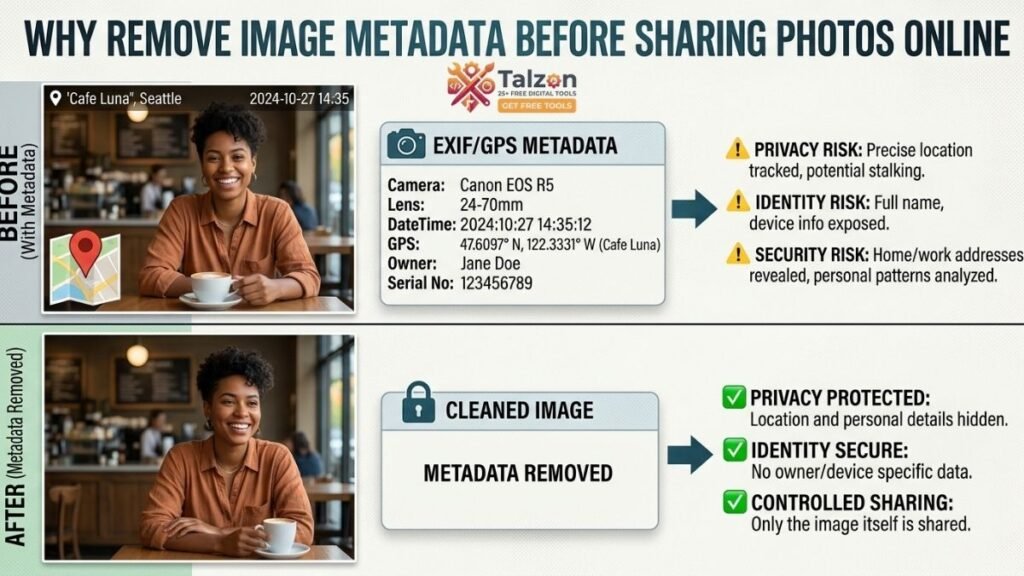
Every photo you take carries more than just pixels. Hidden inside every image file is a layer of data most people never see—metadata that can reveal where you live, what device you use, and even when you were at a specific location.
If you’ve ever shared a photo online without thinking twice, you might be unknowingly handing strangers a detailed map of your life. That’s why using an image metadata remover before sharing photos isn’t just a tech-savvy move—it’s a privacy essential in 2026.
What Is Image Metadata?
Image metadata is information embedded in your photo files by your camera or smartphone. The most common type is EXIF data (Exchangeable Image File Format), which stores technical details about how and where a photo was captured.
Typical EXIF fields include:
- GPS coordinates (latitude, longitude, altitude)
- Date and time the photo was taken
- Camera make and model (e.g., iPhone 15, Samsung S24)
- Shutter speed, aperture, ISO, focal length
- Software used for editing
- Device serial numbers and unique identifiers
Other metadata standards like IPTC and XMP can store copyright info, author names, keywords, and even AI-generated content markers.
While this data is useful for photographers organizing their work, it becomes a privacy risk the moment you share the image publicly.
Why Metadata Is a Privacy Risk
1. Location Leakage
The biggest concern is GPS geotagging. Modern smartphones automatically embed precise location data in every photo unless you manually disable it.
If someone downloads your image, they can extract the GPS coordinates and pinpoint exactly where the photo was taken—often within a few meters. This could reveal:
- Your home address
- Your workplace
- Your children’s school
- Your regular gym, coffee shop, or travel routes
For stalkers, burglars, or data brokers, this is gold.
2. Device Fingerprinting
Metadata also includes your device make and model, and sometimes even serial numbers. When combined with timestamps and location data, this can help bad actors correlate multiple images to a single person or device.
In other words, your photos can be used to build a digital fingerprint of your habits and identity.
3. Timeline Reconstruction
The DateTimeOriginal field tells exactly when a photo was captured. If you post a series of images over time, someone could reconstruct your daily routine: when you leave home, when you’re at work, when you travel.
This kind of timeline is especially dangerous if you share photos of high-value items (jewelry, electronics, new cars) along with location and time data.
4. AI and Platform Tracking Markers
In 2026, many platforms and AI tools add their own hidden markers to images—like C2PA Content Credentials, AI disclosure tags, or platform-specific tracking IDs.
These can reveal:
- Whether an image was AI-generated
- Which software or platform edited it
- Potentially even your account or session identifiers
While some of this is meant for transparency, it can also be used to track your content across the web.
Real-World Scenarios Where Metadata Hurts
- Real estate listings: Agents sometimes share interior photos with GPS data, inadvertently revealing the exact address before the official listing goes live.
- Job applications: Sending a portfolio with unstripped metadata can expose your home location and device details to potential employers—or hackers if the company’s systems are breached.
- Social media posts: A vacation photo with intact EXIF data can tell criminals when your home is empty and where you’re staying.
- Online marketplaces: Selling items on Facebook Marketplace or Craigslist with original photos can give buyers your exact location and device info.
Why You Should Use an Image Metadata Remover
An image metadata remover is a tool designed to strip EXIF, IPTC, XMP, and other hidden data from your photos before you share them.
Using one gives you:
- Privacy protection: No more accidental location leaks or device fingerprinting.
- Smaller file sizes: Removing metadata can reduce image file weight, improving upload speeds and Core Web Vitals for websites.
- Control over your digital footprint: You decide what information travels with your images.
- Compliance: For businesses, stripping metadata helps meet data protection regulations like GDPR or HIPAA when sharing client images.
How to Remove Metadata from Photos
Option 1: Built-In OS Tools
Windows 11:
- Right-click the image file → Properties.
- Go to the Details tab.
- Click Remove Properties and Personal Information.
- Choose to create a copy with metadata removed.
macOS:
- Open the image in Preview.
- Go to Tools → Show Inspector.
- Under the i tab, you can view EXIF data.
- To remove it, export the image as a new file (some metadata may remain, so third-party tools are often better).
Option 2: Free Online Metadata Removers
Several free, privacy-focused tools let you upload an image and download a clean version:
- AICleanify: Removes EXIF, GPS, C2PA, XMP, IPTC, and AI markers in one click.
- ProMetadata Cleaner: Strips GPS, camera info, and author data from photos and PDFs.
- GeoImageTagger EXIF Remover: Free, private, and removes location and device data.
- Vaultaire Photo Metadata Remover: Lets you view and remove EXIF, GPS, and AI content credentials.
Most of these work directly in your browser, so your images aren’t stored on a server.
Option 3: Dedicated Software
For photographers or power users, desktop tools offer batch processing and more control:
- ExifTool: The most powerful command-line tool for metadata removal.
- Exif Cleaner: User-friendly GUI for Windows/macOS.
- ImageMagick: Can strip metadata during image conversion or resizing.
Example ExifTool command to remove all metadata:
exiftool -all= photo.jpgTo remove only GPS data but keep other metadata:
exiftool -gps:all= photo.jpgOption 4: Mobile Apps
If you share photos directly from your phone, consider apps like:
- Exif Remover PI (Android): Removes EXIF and location data offline.
- Metadata Remover & EXIF Viewer (iOS/Android): Lets you view and strip metadata before sharing.
Best Practices for Safe Photo Sharing
- Always strip metadata before posting publicly—especially on social media, forums, or marketplaces.
- Use an image metadata remover as part of your workflow before sending photos to clients, employers, or strangers.
- Disable GPS tagging in your camera settings if you don’t need location data.
- Check AI markers if you’re using generative AI tools—some platforms add hidden credentials.
- Educate your team or family about metadata risks, especially if kids or employees share photos online.
Common Myths About Metadata
- “Social media platforms strip metadata automatically.”
Not always. While some platforms like Facebook and Instagram remove most EXIF data, others (like messaging apps or file-sharing services) may preserve it. - “Only professionals need to worry about metadata.”
False. Anyone with a smartphone can leak location and device data. - “Metadata is useful, so I should keep it.”
Keep it for your personal archives, but never for public sharing. You can always re-add metadata later if needed.
Final Thoughts
Your photos tell stories—but they shouldn’t tell strangers where you live, what device you use, or when you’re away from home.
Using an image metadata remover is a simple, free step that protects your privacy without sacrificing image quality. Whether you’re a casual social media user, a photographer, or a business owner, stripping metadata before sharing photos is one of the easiest ways to take control of your digital footprint in 2026.
Next time you’re about to hit “post” or “send,” ask yourself: What hidden data is traveling with this image? Then run it through a metadata remover first. Your future self will thank you.