
Benefits of Converting Photos to PDF: Image to PDF Guide
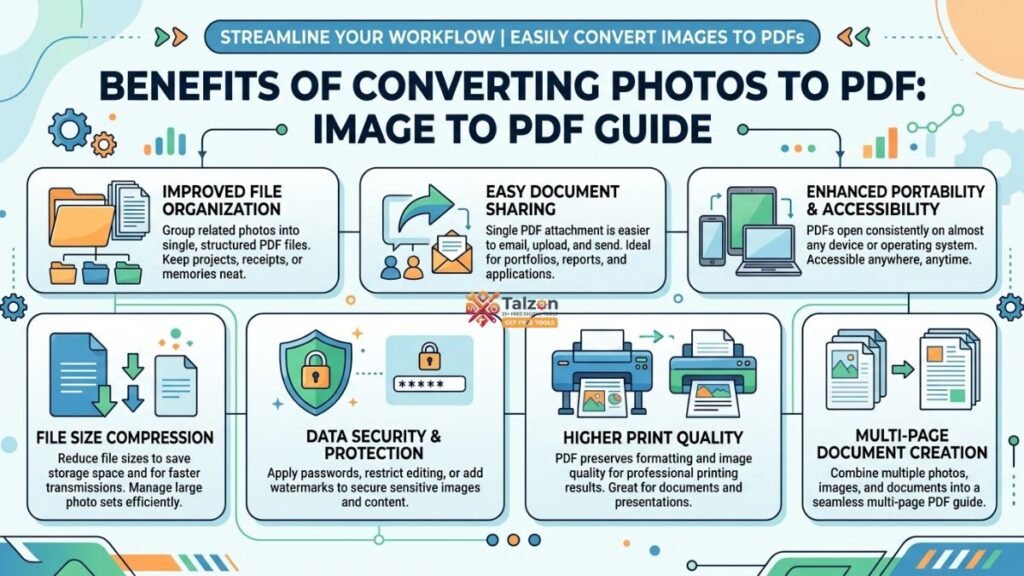
In a world where we capture hundreds of photos on our phones and cameras, organizing and sharing them efficiently matters more than ever. Converting your images to PDF is one of the smartest moves you can make for better document management, professional sharing, and long-term preservation. This guide walks you through the real-world benefits of turning your photos into PDFs and shows why “image to PDF” should be part of your digital workflow.
Why Convert Photos to PDF in the First Place?
At first glance, it might seem unnecessary to change a JPG or PNG into a PDF. After all, image formats work fine for social media and casual viewing. But PDFs were designed for documents—meaning they handle layout, structure, and consistency in ways image files simply can’t.
When you convert photos to PDF, you’re not just changing the file extension. You’re unlocking a format built for reliability, portability, and professional use. Whether you’re a student submitting assignments, a freelancer sending portfolios, or someone archiving family memories, PDFs offer advantages that standard image formats don’t.
Universal Compatibility Across Devices
One of the biggest benefits of converting photos to PDF is universal compatibility. PDFs open consistently on virtually every device and operating system—Windows, macOS, Android, iOS, and even web browsers—without needing special software.
With image files, you might run into issues: a HEIC photo from an iPhone won’t open on an older Windows PC, or a PNG might display differently depending on the app. PDFs eliminate that guesswork. When you share an image to PDF document, recipients see exactly what you intended, regardless of their device.
This makes PDFs ideal for:
- Sending documents to clients or colleagues
- Submitting forms or applications online
- Sharing photo collections with family members who use different devices
Preserve Image Quality Without Compression Artifacts
When you repeatedly save or share image files, especially JPGs, they can lose quality due to compression. Each time a JPG is re-saved, some data is discarded, leading to visible artifacts and reduced sharpness over time.
PDFs, on the other hand, can preserve high-resolution images without degradation, especially when using lossless compression modes. Advanced conversion tools let you maintain the original DPI, color profiles, and resolution, ensuring your photos look as crisp in the PDF as they did in the original file.
For photographers, designers, or anyone who cares about visual fidelity, converting image to PDF means your work stays true to its original quality—even after multiple shares or prints.
Combine Multiple Photos Into a Single, Organized File
Trying to email or share ten separate image files is cumbersome. Attachments get lost, order gets mixed up, and recipients end up with a cluttered inbox. Converting multiple photos to a single PDF solves this problem elegantly.
With PDFs, you can merge dozens of images into one well-organized document, with pages in the exact order you want. This is perfect for:
- Creating photo reports or site documentation
- Assembling receipts and expense records
- Building portfolios or lookbooks
- Compiling scanned documents or forms
Instead of sending twenty attachments, you send one clean file that’s easy to navigate and print.
Enhanced Security and Privacy Features
Security is another major advantage of PDFs over standard image formats. While anyone can open and edit a JPG or PNG, PDFs offer built-in protection features like password encryption, digital signatures, and permission restrictions.
This makes PDFs ideal for sensitive content such as:
- Identity documents (IDs, passports, licenses)
- Medical records or prescriptions
- Contracts and legal forms
- Financial statements or receipts
When you convert image to PDF with security settings, you control who can view, print, or edit the file—something impossible with regular photos.
Better for Printing and Professional Submissions
If you’ve ever tried to print a batch of photos only to find they’re the wrong size or resolution, you know the frustration. PDFs are print-ready by design, preserving layout, margins, and image quality exactly as you set them.
Many institutions—schools, government offices, employers—prefer or even require PDF submissions because they ensure consistency. Converting your photos to PDF before printing or submitting means:
- No unexpected cropping or resizing
- Consistent appearance across different printers
- Professional presentation for portfolios, reports, or applications
For anyone dealing with official paperwork or client deliverables, PDFs are the gold standard.
Searchability and Accessibility with OCR
Here’s a feature many people overlook: PDFs can be made searchable. Using Optical Character Recognition (OCR), text within scanned images or photos can be converted into selectable, searchable text inside the PDF.
This transforms static images into functional documents. Imagine scanning a handwritten note or a printed receipt and later being able to search for keywords within the PDF. For businesses and students, this turns image archives into indexed, retrievable resources.
OCR-enabled PDFs also improve accessibility, allowing screen readers to interpret text content—something standard image files can’t do without additional metadata.
Reduced File Size Without Sacrificing Quality
While it might seem counterintuitive, PDFs can often be smaller than a collection of high-resolution images, especially when optimized correctly. PDFs support efficient compression methods that reduce file bloat while maintaining visual quality.
This is particularly useful when:
- Emailing large photo sets with attachment size limits
- Uploading documents to platforms with file restrictions
- Archiving years of photos without consuming excessive storage
By converting image to PDF, you get a compact, manageable file that’s easier to store and share.
Long-Term Archiving and Format Stability
Digital formats come and go, but PDF has remained a stable, widely supported standard for decades. Unlike proprietary image formats that may become obsolete, PDFs are designed for long-term preservation.
Archivists, libraries, and businesses use PDF/A (a special archival PDF standard) to ensure documents remain accessible far into the future. Converting your photos to PDF means your memories, records, and work won’t be trapped in a format that future software can’t open.
For family historians, professionals, or anyone building a digital legacy, PDFs offer peace of mind that your files will stand the test of time.
Easier Annotation, Editing, and Collaboration
PDFs aren’t just for viewing—they’re interactive. Once your photos are in PDF format, you can add comments, highlights, stamps, or signatures directly on the pages.
This is invaluable for:
- Reviewing design mockups or photo edits with clients
- Marking up contracts or forms before signing
- Adding notes to scanned documents or receipts
Collaboration becomes smoother when everyone works from the same PDF file instead of exchanging multiple image versions with confusing filenames.
How to Convert Photos to PDF (Quick Overview)
Converting images to PDF is easier than ever. You can use:
- Built-in tools on your phone or computer (like “Print to PDF” or “Save as PDF”)
- Free online converters that handle JPG, PNG, and other formats
- Dedicated apps for batch conversion and advanced features
Most tools let you choose page size, orientation, margins, and compression settings, giving you full control over the final output.
For best results, look for converters that preserve original resolution and support batch processing if you’re handling multiple images.
Final Thoughts: Make Image to PDF Part of Your Workflow
Converting photos to PDF isn’t just a technical trick—it’s a practical upgrade to how you manage, share, and preserve your digital content. From universal compatibility and quality preservation to security and searchability, the benefits of image to PDF conversion are clear and impactful.
Whether you’re organizing personal memories, preparing professional deliverables, or archiving important records, PDFs give you a reliable, future-proof format that image files alone can’t match. Start converting your photos to PDF today and experience the difference in clarity, control, and convenience.