
LinkedIn Engagement Structure: Boost Readability
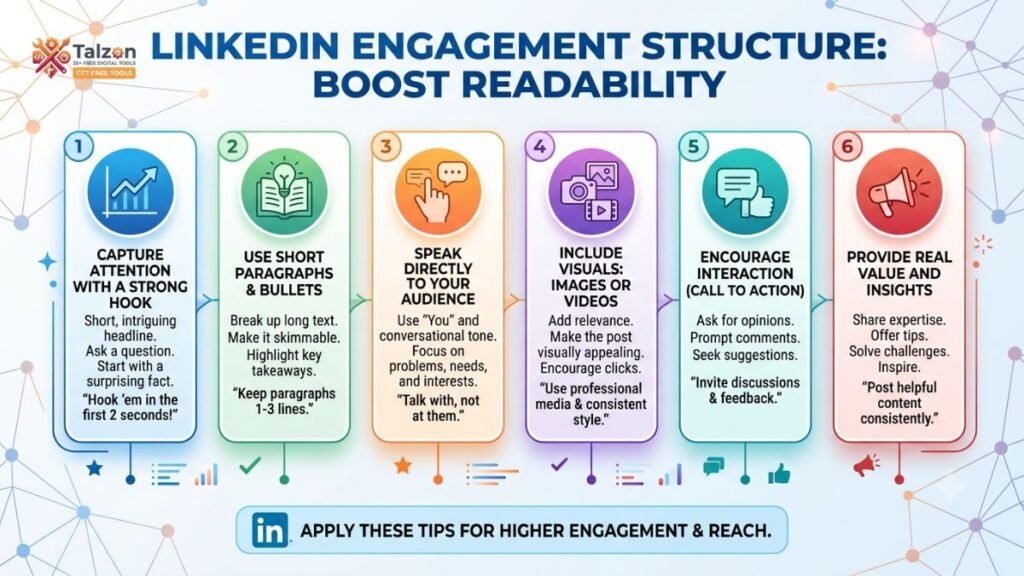
LinkedIn is full of valuable ideas, but not every useful post gets the attention it deserves. Often, the problem is not the quality of the message. It is the way the content is presented.
A dense paragraph, weak opening, or unclear message can make people scroll away before they understand your point. On the other hand, a well-structured post can capture attention, encourage discussion, and help your ideas reach more people.
This is where a strong LinkedIn engagement structure becomes important. By combining readability, relevance, personality, and interaction, you can create LinkedIn content that people want to read and respond to.
In this guide, you will learn how to improve LinkedIn readability and engagement through practical writing and formatting techniques.
What Is LinkedIn Readability?
LinkedIn readability refers to how easily people can understand and move through your content. It includes more than grammar and spelling. It also involves sentence length, paragraph spacing, word choice, formatting, and the logical flow of your message.
Most LinkedIn users do not read every post carefully from beginning to end. They scan their feeds between meetings, during a commute, or while taking a short break. If your content looks difficult to read, they may skip it even when the subject is relevant.
Readable LinkedIn content usually has:
- A clear opening line.
- Short paragraphs.
- Simple and direct language.
- Plenty of white space.
- A logical progression of ideas.
- One clear takeaway.
- A natural invitation to respond.
Readability removes friction. When people can understand your message quickly, they are more likely to pause, continue reading, and engage with the post.
Why LinkedIn Structure Matters
A good LinkedIn post has a beginning, middle, and end. Without this basic structure, your ideas may feel disconnected or confusing.
The beginning should create interest. The middle should deliver useful information or a meaningful story. The ending should give readers a reason to think, respond, or take action.
A practical LinkedIn engagement structure might look like this:
- Start with a strong hook.
- Introduce the problem or situation.
- Share your insight, experience, or solution.
- Support the idea with examples.
- End with a question or clear takeaway.
This structure works because it respects the way people consume content online. It gives readers a reason to stop, a reason to stay, and a reason to participate.
Start With a Strong Hook
The first two lines of a LinkedIn post are extremely important. They appear before the “see more” option, so they need to create enough curiosity for people to continue reading.
A strong hook does not need to be dramatic or controversial. It simply needs to be specific, relevant, and interesting.
You can begin with:
- A surprising lesson.
- A common mistake.
- A personal experience.
- A direct question.
- A useful statistic.
- A clear opinion.
- A before-and-after result.
For example, instead of writing:
Communication is important in the workplace.
You could write:
I used to think being a good communicator meant speaking more. It took me years to learn that listening often creates better results.
The second opening feels more personal and creates curiosity. Readers want to know what changed and what lesson follows.
Avoid vague introductions such as “Here are some thoughts” or “I am excited to share.” These phrases do not give readers a clear reason to continue.
Keep Paragraphs Short
Long blocks of text can be difficult to read on mobile devices. Even when your writing is strong, large paragraphs may make your post look heavy and uninviting.
Try to keep most LinkedIn paragraphs between one and three sentences. A single-sentence paragraph can also be effective when you want to emphasize an important point.
For example:
Your audience does not owe you their attention.
You have to earn it.
This format gives the message more impact than placing both sentences in a dense paragraph.
Short paragraphs also create visual breathing room. White space helps readers scan your post and identify the main ideas without feeling overwhelmed.
Use Simple, Conversational Language
LinkedIn content does not need to sound like a formal report. Professional writing can still feel warm, clear, and human.
Choose familiar words instead of complicated alternatives. For instance:
- Use “help” instead of “facilitate.”
- Use “start” instead of “commence.”
- Use “use” instead of “utilize.”
- Use “show” instead of “demonstrate,” when appropriate.
Simple language does not make your ideas less intelligent. It makes them easier to understand and share.
A conversational tone can also make your content more relatable. Write as though you are explaining the idea to a thoughtful colleague. This approach often produces more natural posts than trying to sound impressive.
Write for One Reader
Many LinkedIn posts become unclear because they try to speak to everyone. A post aimed at “business professionals” is usually less engaging than a post written for a specific person with a specific problem.
Before writing, ask yourself:
- Who needs this information?
- What challenge are they facing?
- What do I want them to understand?
- What action should they take after reading?
You might write for a new manager struggling to give feedback, a freelancer trying to attract clients, or a graduate searching for their first role.
When you understand your audience, your examples become sharper and your language becomes more relevant. Readers are more likely to engage when they feel that a post speaks directly to their experience.
Focus on One Main Idea
A common LinkedIn mistake is trying to cover too much in one post. Writers often include multiple lessons, several opinions, and a long list of recommendations. The result may be informative, but it can also feel scattered.
Choose one central message for each post. Every sentence should support that message or help the reader understand it.
For example, instead of writing about leadership, productivity, workplace culture, and career growth in one post, focus on a single idea such as:
Why new managers should schedule regular one-to-one conversations.
A focused post is easier to read, remember, and discuss. It also allows you to explore the subject with greater depth.
Use Formatting to Improve Scanning
Good LinkedIn formatting guides the reader’s eyes. You can use visual structure without making the post look artificial or overloaded.
Helpful formatting techniques include:
- Use line breaks between ideas.
- Use numbered points for processes.
- Use bullet points for short lists.
- Use parentheses sparingly.
- Highlight contrast with short sentences.
- Place the most important message near the beginning and end.
Emojis can sometimes improve readability, especially when they act as visual markers. However, they should support the content rather than distract from it. Use them selectively and consider whether they fit your professional voice.
Avoid excessive capital letters, decorative symbols, and multiple hashtags. These elements can make your post appear noisy and reduce its credibility.
Add Stories and Specific Examples
Advice becomes more engaging when readers can see it in action. A short story or specific example can make an abstract idea easier to understand.
You do not need to share a dramatic personal transformation. Small, honest experiences can be powerful.
For example:
During my first month as a team leader, I ended every meeting by asking, “Does anyone have questions?” Nobody answered. Later, I changed the question to, “What part of this plan feels unclear?” The quality of the discussion improved immediately.
This story works because it includes a situation, a problem, a change, and a result. It also gives readers a practical lesson they can apply.
When sharing personal experiences, focus on the insight rather than presenting yourself as perfect. Vulnerability and honesty often create stronger connections than polished success stories.
Make Your Content More Specific
General advice is easy to ignore because it does not give readers enough detail. Specific content feels more useful and credible.
Compare these two statements:
Build strong professional relationships.
Send one thoughtful message each week to someone whose work you genuinely appreciate.
The second statement gives readers a clear action. It is easier to remember and easier to try.
Whenever possible, include examples, time frames, steps, mistakes, or measurable outcomes. Instead of saying that a strategy “worked well,” explain what changed. Specific details help readers trust your message and understand how to apply it.
Create a Clear Call to Action
Engagement does not always happen automatically. If you want readers to comment, ask them something that is easy and meaningful to answer.
Weak calls to action include:
- What do you think?
- Agree?
- Any thoughts?
These questions are broad and require too much effort from the reader.
Stronger questions are more specific:
- What is one communication habit that improved your work?
- Which of these mistakes have you experienced?
- Would you choose speed or quality in this situation?
- What advice would you give someone facing this challenge?
A good question connects directly to the post. It should not feel added at the last moment simply to generate comments.
You can also invite engagement by asking readers to share an example, choose between two options, or explain what they would do differently.
Use Hashtags Carefully
Hashtags can help categorize your content, but they should not replace strong writing. A post with a clear message and relevant keywords is more valuable than a crowded group of unrelated hashtags.
Choose a small number of hashtags that accurately describe your topic. For example, a post about workplace communication might use hashtags related to communication, leadership, and professional development.
Avoid using hashtags that are popular but unrelated. They may attract brief attention, but they can confuse your audience and make the post seem less focused.
Your main keyword, LinkedIn engagement structure, can also be included naturally in a longer article, LinkedIn guide, or content strategy document. Do not force it into every sentence. Keyword use should support the reader, not interrupt the writing.
Improve Engagement After Publishing
Your work does not end when you publish the post. Early interaction can help create a stronger conversation around your content.
After publishing:
- Respond to comments with more than a single-word reply.
- Ask follow-up questions.
- Thank people for sharing useful perspectives.
- Correct misunderstandings politely.
- Continue the discussion while the topic is active.
- Review which parts of the post received the most response.
Thoughtful replies show that you are interested in conversation, not just visibility. They can also turn a simple comment into a valuable professional discussion.
Avoid replying to every comment with the same phrase. Personalized responses feel more genuine and encourage people to participate again.
Review Your LinkedIn Performance
Use your LinkedIn analytics to understand what your audience finds useful. Look for patterns rather than focusing on one post that performed unusually well or poorly.
Review:
- Which topics received the most reactions.
- Which posts generated meaningful comments.
- Which openings encouraged people to read further.
- Whether personal stories outperformed general advice.
- What types of questions created discussion.
- Which formats attracted profile visits or shares.
Analytics cannot explain everything, but they can reveal useful trends. Combine performance data with your own judgment and audience feedback.
The goal is not to copy one successful post repeatedly. It is to understand why certain ideas, structures, and formats connect with your audience.
A Simple LinkedIn Post Formula
When you are unsure how to organize a post, use this simple formula:
Hook: Introduce a surprising idea, problem, or question.
Context: Explain why the subject matters.
Insight: Share what you learned or believe.
Evidence: Add a story, example, or supporting detail.
Action: Give readers one practical step.
Question: Invite them to share their perspective.
For example, a post about networking could begin with a personal mistake, explain why transactional networking often fails, share a more genuine approach, and end by asking readers how they maintain professional relationships.
This formula is flexible. You can adapt it to career advice, leadership, marketing, hiring, entrepreneurship, or personal development.
Final Thoughts
Improving LinkedIn readability and engagement is not about using complicated tactics. It is about making your message easier to understand and more relevant to real people.
Start with a strong hook, use short paragraphs, focus on one idea, and include details that readers can apply. Then finish with a genuine question and take time to participate in the conversation.
A thoughtful LinkedIn engagement structure helps your content do more than attract views. It helps people understand your ideas, remember your perspective, and feel comfortable joining the discussion.