
LinkedIn Post Formatter for Maximum Engagement
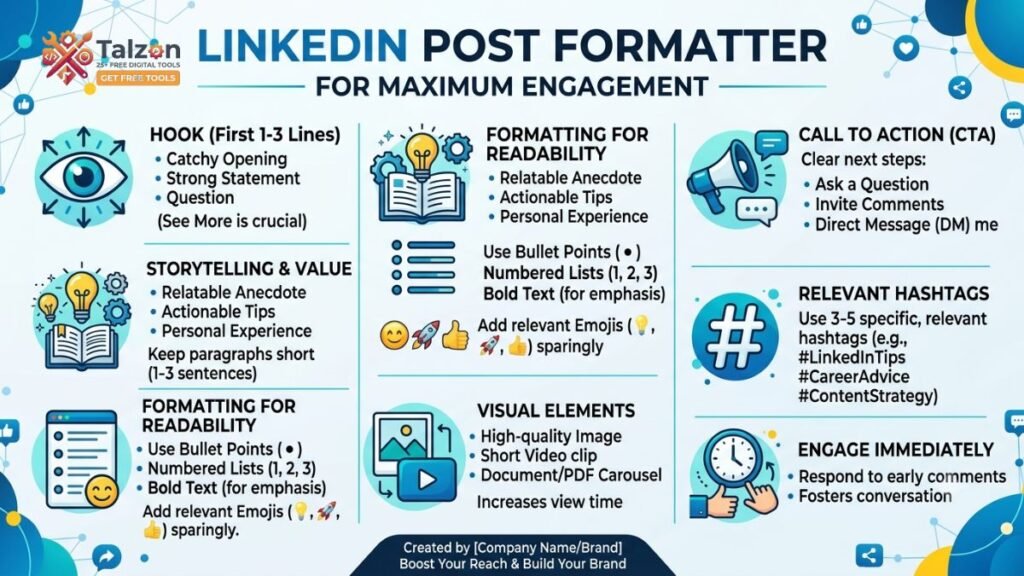
If you want more people to stop, read, and respond to your LinkedIn content, formatting matters just as much as the idea itself. A strong LinkedIn post formatter approach can turn a plain post into something that feels easier to scan, more polished, and more engaging.
Why LinkedIn Post Formatting Matters
LinkedIn is a fast-moving feed, and most people skim before they commit to reading. If your post looks like a wall of text, it is easy for readers to scroll past without a second thought.
Good formatting helps you create clarity, guide attention, and make your message feel more approachable. It also improves the chances that people will read to the end, leave a comment, or share the post with their network.
What Makes a LinkedIn Post Engaging
An engaging LinkedIn post usually has three things: a strong opening, a clear structure, and a takeaway that feels relevant. Even great ideas can underperform if they are buried in dense paragraphs or confusing formatting.
The goal is not to make your post look fancy. The goal is to make it easy to read, easy to understand, and easy to act on.
Start With a Strong Hook
The first one or two lines are the most important part of your post because they determine whether people keep reading. Your hook should create curiosity, promise value, or speak directly to a pain point your audience recognizes.
You can start with a surprising statement, a bold opinion, a question, or a short story moment. For example, instead of writing “Here are some tips for LinkedIn,” try “Most LinkedIn posts fail before people even read the third line.”
Use Short Paragraphs
One of the simplest ways to improve readability is to break long blocks of text into short paragraphs. On LinkedIn, dense paragraphs can feel heavy and intimidating, especially on mobile screens.
Keep most paragraphs to one to three sentences. This creates more white space and gives the eye natural pauses, which makes the content feel easier to follow.
Add Line Breaks Strategically
Line breaks are one of the most useful tools in a LinkedIn post formatter workflow because they help control pacing. They can emphasize key points, separate ideas, and make your writing look more intentional.
Use a line break after your hook, between major ideas, and before your call to action. This gives your post a rhythm that feels conversational rather than crowded.
Use Simple Language
LinkedIn is not the place to show off complex vocabulary or overloaded sentences. Simple language is usually more effective because it feels direct and human.
Write the way you would speak to a smart colleague. If a sentence takes effort to decode, simplify it. Clear writing almost always performs better than clever writing that slows readers down.
Format for Mobile Readers
A large share of LinkedIn users browse on their phones, which means your post needs to look good on a smaller screen. Long paragraphs, excessive punctuation, and cluttered text can make mobile reading tiring.
To improve mobile readability, use short lines, clean spacing, and minimal formatting distractions. A post that looks clean on mobile is far more likely to keep attention.
Use Bullet Points for Scannability
Bullet points work well when you want to share tips, steps, examples, or key takeaways. They help readers quickly understand the structure of your content without having to decode a long paragraph.
Keep bullet points concise and parallel in style. For example:
- Make the hook clear.
- Break up long paragraphs.
- Use white space to guide reading.
- End with a specific call to action.
This makes your content feel organized and easy to absorb.
Highlight One Main Idea
Every strong LinkedIn post should have one central message. If you try to cover too many ideas at once, the post can lose focus and the audience may not know what to remember.
Ask yourself: what do I want people to think, feel, or do after reading? If the answer is unclear, simplify the post before publishing.
Use Storytelling When It Fits
Stories help posts feel human and memorable. A short personal experience, client lesson, or behind-the-scenes moment can make your content more relatable and more engaging.
You do not need a full narrative every time. Even a small story fragment like “I used to write long LinkedIn posts that nobody finished reading” can create instant connection and make the lesson more believable.
End With a Clear Call to Action
A post should not just inform; it should guide the next step. A clear call to action tells readers what to do after they finish reading.
This could be asking a question, inviting opinions, encouraging saves, or prompting them to share their experience. For example: “What formatting change has improved your LinkedIn posts the most?” Simple CTAs often generate more comments because they are easy to answer.
Make Your Posts Easy to Scan
Most people do not read every word on first pass. They scan for useful ideas, emotional cues, and parts that feel relevant to them.
To support that behavior, use formatting that stands out naturally:
- Short sentences.
- Strong opening lines.
- White space between ideas.
- Occasional bold phrasing in external drafts, if you use it sparingly.
- Clean structure from top to bottom.
A post that is easy to scan is a post that has a better chance of being read fully.
Avoid Common Formatting Mistakes
Poor formatting can weaken even great content. Some of the most common mistakes include writing huge blocks of text, using too many emojis, overusing capital letters, and making every line feel promotional.
Another mistake is formatting without purpose. If every line is broken up randomly, the post feels messy instead of readable. Good formatting should support the message, not distract from it.
Use a Consistent Structure
A repeatable structure helps you write faster and keeps your posts recognizable. Over time, your audience starts to understand how you present ideas, which builds trust and familiarity.
A simple structure might look like this:
- Hook.
- Problem or insight.
- Supporting points.
- Example or story.
- Call to action.
This is one of the easiest ways to use a LinkedIn post formatter style consistently without making your content feel repetitive.
Examples of Better Formatting
Here is a simple comparison:
Poor format: “LinkedIn posts need better formatting because people skim and short paragraphs help readability and more people engage when content is easier to read.”
Better format:
“LinkedIn posts need better formatting.
People skim.
Short paragraphs help.
White space improves readability.
Clear structure drives more engagement.”
The second version feels easier to read because the rhythm is cleaner and the message is easier to process.
How SEO Helps LinkedIn Content
SEO is not only for blogs and websites. It also matters on LinkedIn because clearer language and relevant keyword use can make your post easier to discover and more aligned with your audience’s search intent.
If your focus keyword is LinkedIn post formatter, use it naturally in the title, opening, and one or two relevant sections. Do not force it into every paragraph. The best SEO still reads like a real person wrote it.
A Simple Formula for Better Posts
If you want a repeatable system, use this formula:
Hook + value + spacing + clarity + CTA.
That formula works because it keeps your post focused and readable. It also helps you avoid the common trap of writing too much without giving readers a clear reason to respond.
Final Tips for Maximum Engagement
The best LinkedIn posts feel easy, useful, and human. They do not try to impress with complexity; they try to connect with the reader quickly.
If you want stronger engagement, focus on structure, readability, and emotional relevance. Use a LinkedIn post formatter mindset every time you write, and your posts will be much more likely to hold attention and spark interaction.
Conclusion
Formatting is one of the most overlooked parts of LinkedIn success. A clear hook, short paragraphs, line breaks, bullet points, and a strong call to action can dramatically improve how your content performs.
When you format with the reader in mind, your ideas become easier to absorb and more likely to get engagement. Start treating your layout as part of your message, and your LinkedIn posts will become more effective over time.