
How Recruiters Use ATS Software to Filter Candidates
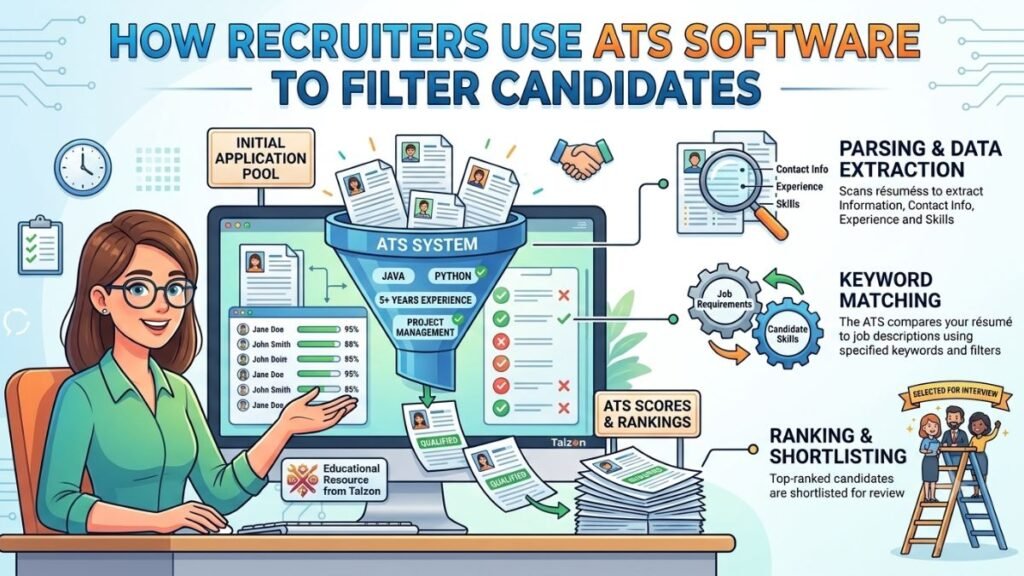
Hiring today can feel like trying to find one strong voice in a room full of noise. Recruiters may receive dozens, hundreds, or even thousands of applications for a single role, and they need a fast, organized way to sort through them. That is where ATS software comes in.
An applicant tracking system helps recruiters collect, scan, rank, and manage job applications more efficiently. But while ATS software saves time for hiring teams, it also changes how candidates need to approach the job search. If you understand how recruiters use ATS software to filter candidates, you can improve your chances of making it past the first round and into a real conversation with a hiring manager. ATS tools are widely used to organize recruiting, automate screening, and help employers find better matches faster.
What Is ATS Software?
ATS software, or applicant tracking software, is a digital system that helps employers manage the hiring process from job posting to final selection. Instead of handling resumes manually, recruiters use ATS software to store applications in one place, search for keywords, sort candidates by fit, and track each applicant through the hiring pipeline. ATS tools are designed to simplify recruitment by automating repetitive tasks and centralizing candidate information.
In simple terms, ATS software acts like a filter and a filing cabinet at the same time. It helps recruiters keep applications organized while also helping them quickly identify which candidates appear to match the role.
Why Recruiters Use ATS Software
Recruiters use ATS software because hiring is often too fast-paced and high-volume to manage manually. When dozens of resumes arrive within hours, no recruiter can carefully read every application line by line right away. ATS software helps them save time, improve consistency, and focus on the most relevant candidates first.
It also improves collaboration. Hiring managers, recruiters, and HR teams can review notes, track interview stages, and make decisions inside the same system. Many ATS platforms also support analytics, compliance, and candidate communication, which makes hiring more efficient overall.
How ATS Software Filters Candidates
ATS software does not “reject” candidates in a human sense, but it does help recruiters narrow the list quickly. Here are the main ways it filters applications.
1. Keyword matching
One of the biggest ways ATS software filters candidates is by scanning resumes for keywords from the job description. These keywords may include job titles, technical skills, certifications, tools, or experience requirements. If a resume includes the right terms, it is more likely to appear as a strong match.
For example, if a posting asks for “project management,” “budget tracking,” and “cross-functional leadership,” the ATS software may favor resumes that include those exact terms or close variations. This is why tailored resumes often perform better than generic ones.
2. Skills and qualifications screening
Recruiters often use ATS software to look for specific qualifications such as degrees, licenses, years of experience, or technical competencies. Some systems allow them to set screening criteria so the software can identify applicants who meet minimum requirements first.
This makes it easier to separate entry-level applicants from more experienced ones, or certified candidates from those who do not yet meet compliance standards.
3. Resume parsing
ATS software reads resumes and pulls key details into structured fields, such as name, contact information, work history, education, and skills. This process is called parsing. If a resume is formatted in a simple, clean way, the ATS can read it more accurately.
If the formatting is too complex, some details may not parse correctly. That can make a qualified candidate look less relevant than they really are.
4. Ranking and scoring
Many ATS platforms rank candidates based on how closely their resumes match the job description. Recruiters can then sort applications by score and review the highest matches first. This is not always a perfect measure of talent, but it is a practical starting point when there are many applicants.
In other words, ATS software helps recruiters build a shortlist quickly, so they can spend more time evaluating the people most likely to fit the role.
5. Knockout questions
Some ATS software includes pre-screening questions such as “Are you authorized to work in this country?” or “Do you have at least three years of experience in this field?” These questions help filter out candidates who do not meet basic job requirements before a recruiter ever reviews the resume.
This step saves time and helps employers focus on applicants who meet the essential criteria.
6. Application tracking workflow
ATS software also filters candidates by stage. Recruiters may move applicants from “new,” to “reviewing,” to “interviewing,” to “offer,” depending on how far they progress. This does not affect the initial filtering as much as it affects the hiring process overall, but it is still a major reason employers use ATS tools.
It keeps the process structured, especially when multiple people are involved in hiring.
What Recruiters Look for in ATS Results
When recruiters review ATS software results, they are usually looking for a mix of hard qualifications and clear relevance. They want to see whether a candidate matches the role’s core requirements, whether their experience is easy to follow, and whether their resume includes the language used in the job posting.
Recruiters also pay attention to consistency. If a resume is messy, vague, or difficult to scan, it may be passed over even if the candidate has strong experience. That is why clarity matters just as much as content.
How to Make Your Resume ATS-Friendly
If you are applying for jobs, understanding ATS software can help you write a resume that gets noticed for the right reasons. You do not need to “trick” the system. You just need to make it easy for both the software and the recruiter to understand your experience.
Use keywords naturally
Read the job description carefully and include the most relevant keywords in your resume where they genuinely apply. Focus on skills, tools, certifications, and responsibilities that match your background.
Do not stuff keywords unnaturally into your resume. That can make your application feel robotic and harder to read.
Keep the format simple
ATS software works best with clean, straightforward formatting. Use standard fonts, clear headings, and a layout without excessive graphics, columns, or text boxes. A simple format helps the system read your resume accurately.
Match the job title where appropriate
If your past role had a similar title to the one in the posting, make sure it is easy to recognize. If the titles differ but the work is similar, highlight the duties in your bullet points so the connection is obvious.
Include a skills section
A dedicated skills section gives ATS software a fast way to identify your strengths. List relevant technical and soft skills that genuinely reflect your experience. This also helps recruiters scan your resume more quickly.
Use standard section headings
Use common section labels such as “Work Experience,” “Education,” and “Skills.” ATS software reads these more reliably than creative headings. Clear structure benefits both the system and the person reviewing your resume.
Common Mistakes Candidates Make
Many candidates lose opportunities because their resumes are not built with ATS software in mind. One common mistake is using a fancy design that looks impressive to people but confuses the software. Another is failing to customize the resume for each role, which means important keywords never appear.
Other mistakes include writing long paragraphs instead of bullet points, using unclear job titles, or forgetting to list important certifications. Even small issues like inconsistent dates or spelling errors can affect how well the resume performs in ATS software.
The Human Side of ATS Software
It is easy to think of ATS software as cold or impersonal, but the goal is usually the opposite. Recruiters use it to handle volume so they can spend more time with the people who seem like a real fit. In that sense, ATS software does not replace human judgment; it supports it.
Still, the system is only as good as the data it reads. That is why candidates should focus on making their resumes easy to understand and recruiters should use ATS software thoughtfully, not blindly. The best hiring decisions usually happen when technology and human judgment work together.
Final Thoughts
ATS software is now a standard part of modern hiring, and understanding how it works can give job seekers a real advantage. Recruiters use it to scan resumes, match keywords, screen qualifications, and manage candidate pipelines faster and more consistently.
If you want your resume to perform well, keep it simple, relevant, and tailored to each job. When you write with ATS software in mind, you are not gaming the system — you are making it easier for the right people to find you.