
How to Match Your Resume to a Job Posting
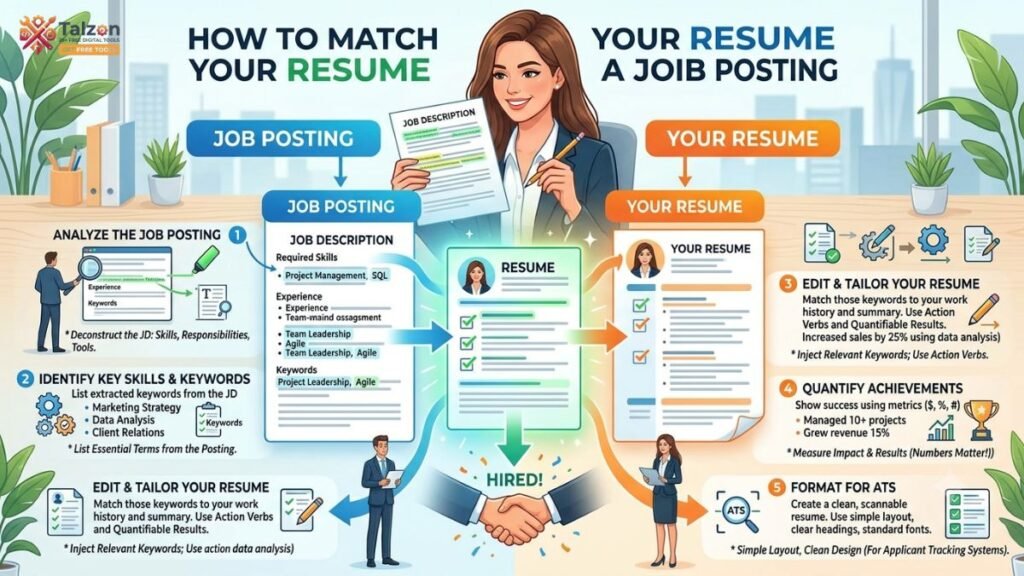
Applying for jobs can feel frustrating when you keep sending out resumes and hearing nothing back. The truth is, many strong candidates get overlooked because their resume does not clearly match the job posting.
That is where a resume keyword matcher can help. By comparing your resume to the exact language in the job description, you can spot missing keywords, improve relevance, and make your application easier for both recruiters and ATS software to understand.
Why Matching Your Resume Matters
Most employers want to see a resume that speaks directly to the role they are hiring for. If your resume looks too generic, it may not show that you have the specific experience they need.
Recruiters often scan resumes quickly, and applicant tracking systems look for relevant terms before a human even sees your application. Matching your resume to the posting helps you pass both filters and improves your chances of getting called in for an interview.
Start With the Job Posting
Before you change a single word on your resume, read the job posting carefully. The goal is not to copy it word for word, but to understand what the employer values most.
Look for:
- Repeated skills or responsibilities.
- Required tools, software, or certifications.
- Action words that describe the role.
- The job title and seniority level.
- Soft skills that appear more than once.
If a phrase shows up several times, it is usually important. A resume keyword matcher can help you identify those repeated terms faster, so you do not miss the details that matter most.
Identify the Right Keywords
Keywords are the bridge between your experience and the employer’s needs. They can include technical skills, industry terms, tools, certifications, and role-specific phrases.
For example, if a job posting mentions “project coordination,” “stakeholder communication,” and “budget tracking,” those are not just buzzwords. They are clues about what the hiring manager wants to see in your resume.
Use the job description to build a short list of keywords you should naturally include where they fit your experience.
Compare Your Resume to the Posting
Once you have the important terms, compare them against your current resume. Ask yourself:
- Did I use the same language as the posting?
- Did I include the most relevant skills?
- Are my achievements tied to the job’s priorities?
- Did I leave out experience that should be emphasized?
This is where a resume keyword matcher becomes especially useful. It helps you see the gap between what the employer asked for and what your resume actually says.
Update Your Summary First
Your professional summary is one of the first things recruiters read, so it should reflect the role you want. If your summary sounds broad or outdated, it can weaken the entire application.
Rewrite it so it includes:
- The target job title.
- Your years of relevant experience.
- A few top skills from the posting.
- One strong achievement or specialty.
For example, instead of writing a vague summary like “Results-driven professional with experience in business operations,” you could write: “Detail-oriented operations coordinator with 5+ years of experience in project support, process improvement, and stakeholder communication.”
Tailor Your Skills Section
Your skills section should not be a random list of everything you have ever done. It should be focused and aligned with the job posting.
Put the most relevant skills near the top. If the posting asks for Excel, CRM tools, data analysis, and reporting, those should appear before less relevant items. This helps both ATS systems and recruiters immediately see that you are a fit.
A smart resume keyword matcher can show which skills are present, which are missing, and which ones should be moved higher.
Reorder Your Experience Strategically
Your work history does not need to be rewritten from scratch, but it should be rearranged to highlight the best match. Put your most relevant achievements first under each role.
If one job posting emphasizes client communication and another emphasizes process improvement, adjust the order of your bullets so the most relevant accomplishments appear first. This makes your resume feel customized without sounding forced.
Try this approach:
- Lead with results that match the posting.
- Use strong action verbs.
- Include numbers where possible.
- Replace generic duties with measurable outcomes.
For example, instead of “Responsible for customer support,” write “Resolved 40+ customer inquiries daily while maintaining a 96% satisfaction rating.”
Use the Job Posting’s Language Naturally
One of the easiest ways to improve your match is to mirror the language used in the posting. If the employer says “cross-functional collaboration,” do not rewrite it as “worked with different teams” unless space or tone requires it.
That does not mean stuffing your resume with repeated phrases. It means using the same wording where it fits honestly and naturally. This is one of the most effective uses of a resume keyword matcher because it helps you spot wording differences that may be hurting your score.
Avoid Common Resume Mistakes
Even strong candidates make small mistakes that weaken their resumes. The most common ones are easy to fix once you know what to look for.
Avoid these errors:
- Using one generic resume for every job.
- Copying keywords without real experience behind them.
- Listing too many unrelated skills.
- Writing long, vague bullet points.
- Leaving out measurable results.
A resume should feel specific, clear, and believable. If it sounds like it could belong to anyone, it probably needs more tailoring.
Keep It Human, Not Robotic
Keyword matching is important, but your resume still needs to sound like a real person wrote it. Hiring managers can tell when a resume has been overloaded with awkward phrases just to impress ATS software.
Write with confidence and clarity. Focus on what you actually did, how you did it, and what happened as a result. The best resumes blend keyword relevance with a natural, professional voice.
A Simple Matching Process
If you want a repeatable system, use this simple process every time you apply:
- Read the job posting carefully.
- Highlight repeated keywords and must-have skills.
- Compare them to your current resume.
- Update your summary, skills, and top bullets.
- Run your resume through a resume keyword matcher.
- Review the missing terms and revise naturally.
- Check for clarity, formatting, and accuracy.
This method keeps the process manageable and saves time when you are applying to multiple jobs.
Final Thoughts
Matching your resume to a job posting is not about pretending to be someone you are not. It is about presenting your real experience in the language the employer understands.
When you use a resume keyword matcher, you make it easier to find the right terms, improve your alignment with the job description, and create a stronger first impression. A small amount of tailoring can make a big difference in whether your resume gets noticed.